
- Home ›
- JFreeChartを使ったグラフ作成 ›
- 極座標グラフ(PolarChart) ›
- HERE
極座標グラフの描画領域(PolarPlotクラス)
グラフの描画領域を取得し、描画領域に対する設定を行っていきます。ファクトリメソッドを使ってJFreeChartクラスのオブジェクトを作成した場合は、JFreeChartクラスで用意されている「getPlot」メソッドを使ってPlotクラスのオブジェクトを取得します。
getPlot
public Plot getPlot()
Returns the plot for the chart. The plot is a class responsible for
coordinating the visual representation of the data, including the
axes (if any).

Returns:
  The plot.
極座標グラフの場合には、取得したPlotクラスのオブジェクトを、PlotクラスのサブクラスであるPolarPlotクラスにキャストして取得して使います。例えば次のように記述します。
JFreeChart chart = ChartFactory.createPolarChart(...);      /* 引数は省略 */

PolarPlot plot = (PolarPlot)chart.getPlot();
ではPolarPlotクラスについて確認します。
PolarPlotクラス
PolarPlotクラスのクラス図は次のようになっています。
- java.lang.Object
- org.jfree.chart.plot.Plot
- org.jfree.chart.plot.PolarPlot
- public class PolarPlot extends Plot implements ValueAxisPlot, Zoomable, RendererChangeListener, java.lang.Cloneable, java.io.Serializable
用意されているコンストラクタは次の2つです。
| コンストラクタ |
|---|
| PolarPlot() Default constructor. |
| PolarPlot(XYDataset dataset, ValueAxis radiusAxis, PolarItemRenderer renderer) Creates a new plot. |
今回はコンストラクタでオブジェクトを直接生成するのではなく、JFreeChartクラスの「getPlot」メソッドでオブジェクトを取得します。
取得したPolarPlotクラスのオブジェクトは極座標グラフの描画領域を表すオブジェクトです。PolarPlotクラスで定義されているメソッドや、親クラスのPlotクラスで用意されているメソッドを使用して描画領域に対する設定を行うことが可能です。
サンプルプログラム
では簡単なサンプルを作成して試してみます。
import org.jfree.chart.JFreeChart;
import org.jfree.chart.ChartFactory;
import org.jfree.data.xy.XYSeriesCollection;
import org.jfree.data.xy.XYSeries;

import javax.swing.JFrame;
import java.awt.BorderLayout;
import org.jfree.chart.ChartPanel;

import org.jfree.chart.plot.PolarPlot;
import java.awt.Color;

public class Test4_1 extends JFrame{
  public static void main(String[] args) {
    Test4_1 frame = new Test4_1();

    frame.setDefaultCloseOperation(JFrame.EXIT_ON_CLOSE);
    frame.setBounds(10, 10, 500, 500);
    frame.setTitle("グラフサンプル");
    frame.setVisible(true);
  }

  Test4_1(){
    XYSeriesCollection data = new XYSeriesCollection();
    JFreeChart chart = ChartFactory.createPolarChart("極座標",
                                                    createData(),
                                                    true,
                                                    false,
                                                    false);

    PolarPlot plot = (PolarPlot)chart.getPlot();
    plot.setBackgroundPaint(Color.PINK);

    ChartPanel cpanel = new ChartPanel(chart);
    getContentPane().add(cpanel, BorderLayout.CENTER);
  }

  private XYSeriesCollection createData(){
    XYSeriesCollection data = new XYSeriesCollection();

    XYSeries series = new XYSeries("系列1");
    series.add(0, 80);
    series.add(170, 20);
    series.add(30, 60);
    series.add(110, 10);
    series.add(260, 50);
    series.add(190, -20);
    series.add(230, 0);
    series.add(330, 80);

    data.addSeries(series);

    return data;
  }
}
上記をコンパイルした後で実行すると次のようにJavaアプリケーションが起動します。
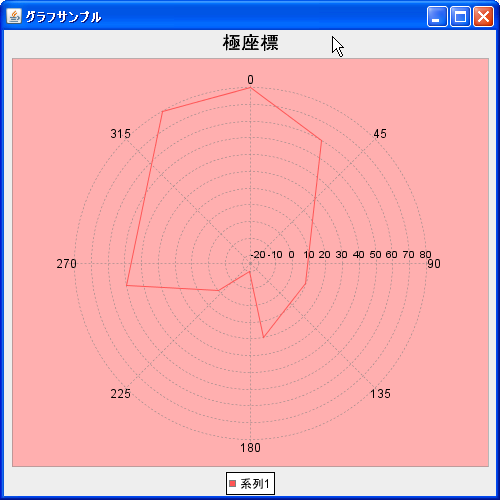
今回は例として描画領域の背景色をピンクに変更しました。また上記のピンクの箇所がグラフの描画領域となります。
( Written by Tatsuo Ikura )
 JavaDrive