
- Home ›
- JFreeChartを使ったグラフ作成 ›
- ヒストグラム(Histogram) ›
- HERE
ヒストグラムの作成(createHistogramメソッド)
ヒストグラムの基本的な作成方法を確認します。
まずChartFactoryクラスの「createHistogram」メソッドを使ってヒストグラムを扱うJFreeChartクラスのオブジェクトを作成します。
createHistogram
public static JFreeChart createHistogram(java.lang.String title,
                                         java.lang.String xAxisLabel,
                                         java.lang.String yAxisLabel,
                                         IntervalXYDataset dataset,
                                         PlotOrientation orientation,
                                         boolean legend,
                                         boolean tooltips,
                                         boolean urls)
Creates a histogram chart. This chart is constructed with an XYPlot
using an XYBarRenderer. The domain and range axes are NumberAxis instances.

Parameters:
  title - the chart title (null permitted).
  xAxisLabel - the x axis label (null permitted).
  yAxisLabel - the y axis label (null permitted).
  dataset - the dataset (null permitted).
  orientation - the orientation (horizontal or vertical) (null NOT
    permitted).
  legend - create a legend?
  tooltips - display tooltips?
  urls - generate URLs?
Returns:
  The chart.
1番目の引数にグラフのタイトルを文字列で指定します。
2番目の引数にはX軸のラベルを文字列で指定します。3番目の引数にはY軸のラベルを文字列で指定します。
4番目の引数にはグラフのデータをIntervalXYDatasetインターフェースを実装したクラスのオブジェクトで指定します。今回はHistogramDatasetクラスを使います。詳細は次のページで確認します。
5番目の引数にはグラフの向きを指定します。指定可能な値はorg.jfree.chart.plot.PlotOrientationクラスで定義されており、次のどちらかとなります。
PlotOrientation.VERTICAL    デフォルト
PlotOrientation.HORIZONTAL  X軸とY軸が反転
6番目の引数には凡例を表示するかどうかを「true」か「false」で指定します。
7番目の引数にはツールチップを作成するかどうかを「true」か「false」で指定します。
8番目の引数にはURLを作成するかどうかを「true」か「false」で指定します。
実際の使い方は次のようになります。
HistogramDataset data = new HistogramDataset();
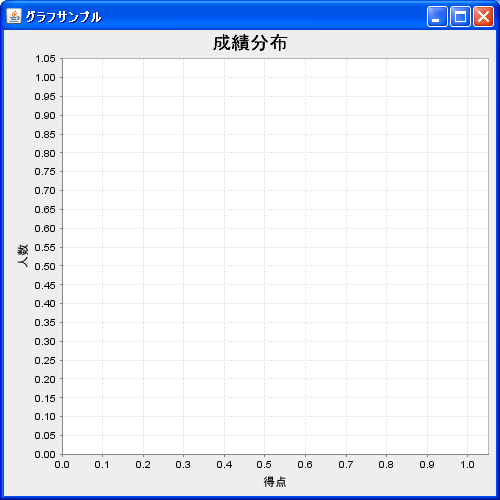
JFreeChart chart = ChartFactory.createHistogram("成績分布",
                                                "得点",
                                                "人数",
                                                data,
                                                PlotOrientation.VERTICAL,
                                                true,
                                                false,
                                                false);
実際のデータの追加方法は次のページで確認します。
サンプルプログラム
では簡単なサンプルを作成して試してみます。
import org.jfree.chart.JFreeChart;
import org.jfree.chart.ChartFactory;
import org.jfree.data.statistics.HistogramDataset;
import org.jfree.chart.plot.PlotOrientation;

import javax.swing.JFrame;
import java.awt.BorderLayout;
import org.jfree.chart.ChartPanel;

public class Test1_1 extends JFrame{
  public static void main(String[] args) {
    Test1_1 frame = new Test1_1();

    frame.setDefaultCloseOperation(JFrame.EXIT_ON_CLOSE);
    frame.setBounds(10, 10, 500, 500);
    frame.setTitle("グラフサンプル");
    frame.setVisible(true);
  }

  Test1_1(){
    HistogramDataset data = new HistogramDataset();
    JFreeChart chart = ChartFactory.createHistogram("成績分布",
                                                    "得点",
                                                    "人数",
                                                    data,
                                                    PlotOrientation.VERTICAL,
                                                    true,
                                                    false,
                                                    false);

    ChartPanel cpanel = new ChartPanel(chart);
    getContentPane().add(cpanel, BorderLayout.CENTER);
  }
}
上記をコンパイルした後で実行すると次のようにJavaアプリケーションが起動します。
( Written by Tatsuo Ikura )
 JavaDrive