
- Home ›
- Applet(アプレット)入門 ›
- Graphicsクラス ›
- HERE
連続した直線を描く
広告
次は複数の点の配列を用意し、最初の点から次の点へと順番に直接を引いてみます。GraphicsクラスのdrawPolylineメソッドを使います。
drawPolyline
public abstract void drawPolyline(int[] xPoints, int[] yPoints, int nPoints)
x 座標と y 座標の配列で定義され連続的につながった直線を描きます。座標 (x, y)
の各ペアは点を定義します。最初の座標と最後の座標が一致しない場合、図形は
閉じません。

パラメータ:
  xPoints - x 点の配列
  yPoints - y 点の配列
  nPoints - 点の総数
例えば4つの点を引数に指定した場合、1番目の点から2番目の点へまず直線が引かれ、次に2番目の点から3番目の点へ、最後に3番目の点から4番目の点へと直線が引かれていきます。
例えば下記のように使います。
public void paint(Graphics g){
  int xPoints[] = {10, 50, 20, 120};
  int yPoints[] = {80, 50, 20, 90};

  g.drawPolyline(xPoints, yPoints, 4);
}
サンプルプログラム
では実際に試してみます。
import java.applet.Applet;
import java.awt.Graphics;

/*
<applet code="GraphicsTest8.class" width="150" height="150">
</applet>
*/

public class GraphicsTest8 extends Applet{
  public void paint(Graphics g){
    int xPoints[] = {10, 50, 20, 120};
    int yPoints[] = {80, 50, 20, 90};

    g.drawPolyline(xPoints, yPoints, 4);
  }
}
実際にブラウザで見てみた結果は下記の通りです。
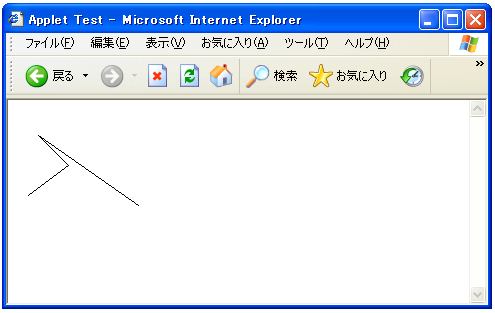
下記で実際に試して頂くことができます。
( Written by Tatsuo Ikura )
 JavaDrive