
- Home ›
- Android入門 ›
- TableLayoutクラス ›
- HERE
列を拡張可能に設定
広告
行に複数のビュー(列)を追加した場合、各ビューはそれぞれが必要な幅に設定されます。全てのビューの幅を設定した後でもまだ横幅に空いた空間がある場合にビューを自動的に拡張して1つの行が横幅いっぱいにまで広げるように設定することが出来ます。
特定の列を拡張可能に設定するには「TableLayout」クラスで用意されている「setColumnStretchable」メソッドを使います。
setColumnStretchable
public void setColumnStretchable(int columnIndex, boolean isStretchable)
Makes the given column stretchable or not. When stretchable, a column
takes up as much as available space as possible in its row.

Calling this method requests a layout operation.

Related XML Attributes:
  android:stretchColumns
Parameters:
  columnIndex  the index of the column
  isStretchable  true if the column must be stretchable, false otherwise.
    Default is false.
1番目の引数には設定したい列のインデックスを指定します。先頭の列が0番目です。2番目の引数には拡張可能にするかどうかを表すboolean型の値を指定します。「true」なら拡張可能です。
各列はデフォルトでは拡張は行わない設定となっていますので拡張可能にしたい列に対して「true」を設定して下さい。
具体的には次のように記述します。
@Override public void onCreate(Bundle icicle) {
    super.onCreate(icicle);

    TableLayout tableLayout = new TableLayout(this);
    tableLayout.setColumnStretchable(1, true);
    setContentView(tableLayout);
}
サンプルプログラム
それでは実際に試してみます。プロジェクトを作成しソースコードを次のように変更しました。
package jp.javadrive.android;

import android.app.Activity;
import android.os.Bundle;
import android.widget.TextView;
import android.widget.EditText;
import android.widget.TableLayout;
import android.widget.TableRow;
import android.view.ViewGroup;

public class Test05_01 extends Activity {
    private final int WC = ViewGroup.LayoutParams.WRAP_CONTENT;
    private final int FP = ViewGroup.LayoutParams.FILL_PARENT;

    @Override public void onCreate(Bundle icicle) {
        super.onCreate(icicle);

        TableLayout tableLayout = new TableLayout(this);
        tableLayout.setColumnStretchable(1, true);
        setContentView(tableLayout);


        TextView text1 = new TextView(this);
        text1.setText("user");

        EditText edit1 = new EditText(this);

        TableRow tableRow1 = new TableRow(this);
        tableRow1.addView(text1);
        tableRow1.addView(edit1);


        TextView text2 = new TextView(this);
        text2.setText("pass");

        EditText edit2 = new EditText(this);

        TableRow tableRow2 = new TableRow(this);
        tableRow2.addView(text2);
        tableRow2.addView(edit2);


        TextView text3 = new TextView(this);
        text3.setText("mail address");

        EditText edit3 = new EditText(this);

        TableRow tableRow3 = new TableRow(this);
        tableRow3.addView(text3);
        tableRow3.addView(edit3);


        tableLayout.addView(tableRow1, createParam(FP, WC));
        tableLayout.addView(tableRow2, createParam(FP, WC));
        tableLayout.addView(tableRow3, createParam(FP, WC));
    }

    private TableLayout.LayoutParams createParam(int w, int h){
        return new TableLayout.LayoutParams(w, h);
    }
}
ビルド後にエミュレーター上で実行します。
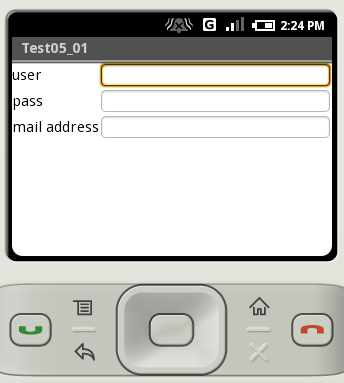
今回テキストボックスが配置されている列には幅を設定していませんが、拡張可能に設定されているため空いたスペースいっぱいにまで拡張されて表示されます。
( Written by Tatsuo Ikura )
 JavaDrive