
- Home ›
- Android入門 ›
- EditTextクラス ›
- HERE
文字列の水平方向の表示位置を設定
広告
文字列を表示する時に表示エリアのどの位置に表示するのかを設定する方法を確認します。「EditText」クラスの親クラスである「TextView」クラスで用意されている「setAlignment」メソッドを使います。
setAlignment
public void setAlignment(Alignment align)
Sets the alignment of this view's text. Valid values are defined in
Layout.

Related XML Attributes:
  android:textAlign

Parameters:
  align  水平位置
引数には水平位置を表す「android.text.Layout.Alignment」クラスで用意されている定数を指定します。指定可能な定数は次の3つです。
Alignment  Alignment.ALIGN_CENTER
Alignment  Alignment.ALIGN_NORMAL
Alignment  Alignment.ALIGN_OPPOSITE
「ALIGN_NORMAL」は通常位置(現在の環境であれば左寄せ)、「ALIGN_CENTER」は中央位置、「ALIGN_OPPOSITE」は通常とは逆の位置(現在の環境であれば右寄せ)となります。値はAlignmentクラスのオブジェクトとして定義されています。
具体的には次のように記述します。
@Override protected void onCreate(Bundle icicle) {
    super.onCreate(icicle);

    EditText edit = new EditText(this);
    edit.setText("", BufferType.NORMAL);
    edit.setAlignment(Alignment.ALIGN_CENTER);
    setContentView(edit);
}
サンプルプログラム
それでは実際に試してみます。プロジェクトを作成しソースコードを次のように変更しました。
package jp.javadrive.android;

import android.app.Activity;
import android.os.Bundle;
import android.widget.LinearLayout;
import android.view.ViewGroup;
import android.widget.EditText;
import android.widget.TextView.BufferType;
import android.text.Layout.Alignment;

public class Test12_01 extends Activity {
    private final int FP = ViewGroup.LayoutParams.FILL_PARENT;
    private final int WC = ViewGroup.LayoutParams.WRAP_CONTENT;

    @Override protected void onCreate(Bundle icicle) {
        super.onCreate(icicle);

        LinearLayout linearLayout = new LinearLayout(this);
        linearLayout.setOrientation(LinearLayout.VERTICAL);
        setContentView(linearLayout);

        EditText edit1 = new EditText(this);
        edit1.setWidth(200);
        edit1.setText("Yamada", BufferType.NORMAL);
        edit1.setAlignment(Alignment.ALIGN_CENTER);
        linearLayout.addView(edit1, createParam(WC, WC));

        EditText edit2 = new EditText(this);
        edit2.setWidth(200);
        edit2.setText("Katou", BufferType.NORMAL);
        edit2.setAlignment(Alignment.ALIGN_OPPOSITE);
        linearLayout.addView(edit2, createParam(WC, WC));
    }

    private LinearLayout.LayoutParams createParam(int w, int h){
        return new LinearLayout.LayoutParams(w, h);
    }
}
ビルド後にエミュレーター上で実行します。
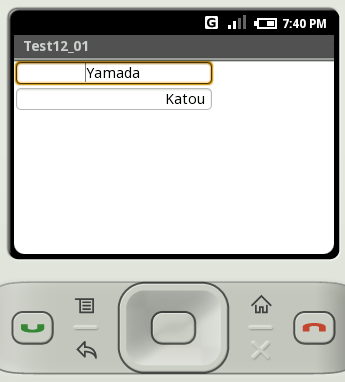
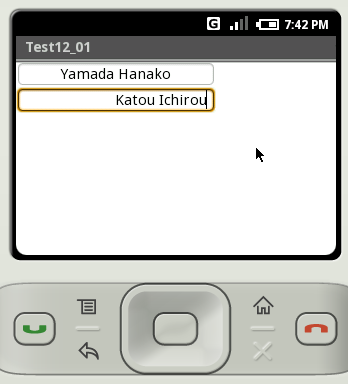
上のテキストボックスは中央揃え、下のテキストボックスは右寄せに設定してあります。
( Written by Tatsuo Ikura )
 JavaDrive