
文字列の形式で色を指定
広告
HTMLなどで使われている「#RRGGBB」の形式や「red」などの色を表すキーワード文字列を使って色を作成する方法を確認します。「Color」クラスで用意されている「parseColor」メソッドを使います。
parseColor
public static int parseColor(String colorString)
Parse the color string, and return the corresponding color-int. If the
string cannot be parsed, throws an IllegalArgumentException exception.
Supported formats are: #RRGGBB #AARRGGBB 'red', 'blue', 'green', 'black',
'white', 'gray', 'cyan', 'magenta', 'yellow', 'lightgray', 'darkgray'

Parameters:
  colorString  color string
1番目の引数に色を表す文字列を指定します。結果として色を表すint型の値を返します。
指定できる文字列は次の方法があります。
#RRGGBB形式
HTML文などで使用されている「#RRGGBB」の形式で指定します。赤緑青を0から255の数値で指定します。指定する際には16進数で記述します。
次のように記述します。
TextView tv = new TextView(this);
tv.setTextColor(Color.parseColor("#FF00C0"));
#AARRGGBB
透明度を表すアルファ値も含めて指定します。アルファ値及び赤緑青を0から255の数値で指定します。指定する際には16進数で記述します。
次のように記述します。
TextView tv = new TextView(this);
tv.setTextColor(Color.parseColor("#FF0F00C0"));
キーワード
色を表すキーワードを使って指定します。指定できる値は次の通りです。
red
blue
green
black
white
gray
cyan
magenta
yellow
lightgraydarkgray
次のように記述します。
TextView tv = new TextView(this);
tv.setTextColor(Color.parseColor("magenta"));
サンプルプログラム
それでは実際に試してみます。プロジェクトを作成しソースコードを次のように変更しました。
package jp.javadrive.android;

import android.app.Activity;
import android.os.Bundle;
import android.widget.TextView;
import android.widget.LinearLayout;
import android.view.ViewGroup;
import android.graphics.Color;

public class Test05_01 extends Activity
{
    private final int WRAP_CONTENT = ViewGroup.LayoutParams.WRAP_CONTENT;

    /** Called with the activity is first created. */
    @Override
    public void onCreate(Bundle icicle)
    {
        super.onCreate(icicle);

        LinearLayout linearLayout = new LinearLayout(this);
        linearLayout.setOrientation(LinearLayout.VERTICAL);
        setContentView(linearLayout);

        TextView tv1 = new TextView(this);
        tv1.setText("#00FF00");
        tv1.setBackgroundColor(Color.parseColor("#00FF00"));
        linearLayout.addView(tv1,
          new LinearLayout.LayoutParams(WRAP_CONTENT, WRAP_CONTENT));

        TextView tv2 = new TextView(this);
        tv2.setText("#3F00FF00");
        tv2.setBackgroundColor(Color.parseColor("#3F00FF00"));
        linearLayout.addView(tv2,
          new LinearLayout.LayoutParams(WRAP_CONTENT, WRAP_CONTENT));

        TextView tv3 = new TextView(this);
        tv3.setText("magenta");
        tv3.setBackgroundColor(Color.parseColor("magenta"));
        linearLayout.addView(tv3,
          new LinearLayout.LayoutParams(WRAP_CONTENT, WRAP_CONTENT));
    }
}
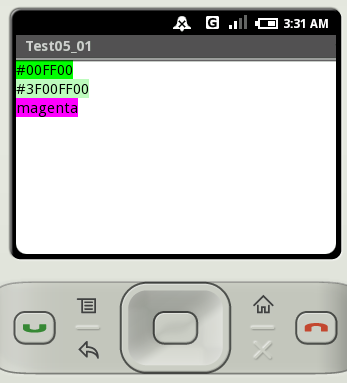
ビルド後にエミュレーター上で実行します。
( Written by Tatsuo Ikura )
 JavaDrive