
透明度を指定して色を作成
広告
RGB(赤緑青)に加えて透明度を表すアルファ値を指定して色を作成する方法を確認します。「Color」クラスで用意されている「argb」メソッドを使います。
argb
public static int argb(int alpha, int red, int green, int blue)
Return a color-int from alpha, red, green, blue components. These component
values should be [0..255], but there is no range check performed, so if
they are out of range, the returned color is undefined.

Parameters:
  alpha  Alpha component [0..255] of the color
  red  Red component [0..255] of the color
  green  Green component [0..255] of the color
  blue  Blue component [0..255] of the color
1番目の引数に透明度を表す数値を指定します。数値は0から255までの数値で指定し、255を指定したときが不透明、0を指定した時が透明となります。
2番目から4番目の引数には「rgb」メソッドと同じく赤緑青を表す数値をそれぞれ0から255までの数値で指定します。結果として色を表すint型の値を返します。
具体的には次のように記述します。
import android.app.Activity;
import android.os.Bundle;
import android.widget.TextView;
import android.graphics.Color;

public class Test extends Activity {
    @Override public void onCreate(Bundle icicle) {
        super.onCreate(icicle);

        TextView tv = new TextView(this);
        tv.setText("Text");
        tv.setTextColor(Color.argb(127, 0, 63, 255));
        setContentView(tv);
    }
}
サンプルプログラム
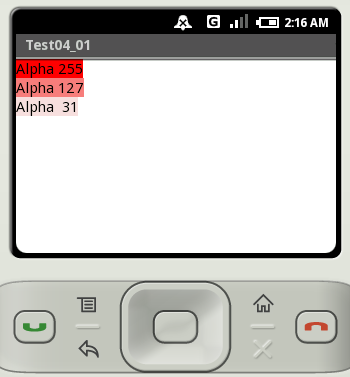
それでは実際に試してみます。プロジェクトを作成しソースコードを次のように変更しました。
package jp.javadrive.android;

import android.app.Activity;
import android.os.Bundle;
import android.widget.TextView;
import android.widget.LinearLayout;
import android.view.ViewGroup;
import android.graphics.Color;

public class Test04_01 extends Activity
{
    private final int WRAP_CONTENT = ViewGroup.LayoutParams.WRAP_CONTENT;

    /** Called with the activity is first created. */
    @Override
    public void onCreate(Bundle icicle)
    {
        super.onCreate(icicle);

        LinearLayout linearLayout = new LinearLayout(this);
        linearLayout.setOrientation(LinearLayout.VERTICAL);
        setContentView(linearLayout);

        TextView tv1 = new TextView(this);
        tv1.setText("Alpha 255");
        tv1.setBackgroundColor(Color.argb(255, 255, 0, 0));
        linearLayout.addView(tv1,
          new LinearLayout.LayoutParams(WRAP_CONTENT, WRAP_CONTENT));

        TextView tv2 = new TextView(this);
        tv2.setText("Alpha 127");
        tv2.setBackgroundColor(Color.argb(127, 255, 0, 0));
        linearLayout.addView(tv2,
          new LinearLayout.LayoutParams(WRAP_CONTENT, WRAP_CONTENT));

        TextView tv3 = new TextView(this);
        tv3.setText("Alpha  31");
        tv3.setBackgroundColor(Color.argb(31, 255, 0, 0));
        linearLayout.addView(tv3,
          new LinearLayout.LayoutParams(WRAP_CONTENT, WRAP_CONTENT));
    }
}
ビルド後にエミュレーター上で実行します。
( Written by Tatsuo Ikura )
 JavaDrive